Track the outcomes.
Build what’s next.
Compass keeps the learning path visible. CARL helps turn the next step into an editable lesson, project, activity or worksheet.
Connected curriculum and lesson planning for homeschool families and the educators who support them.
Tracking with Compass, planning with CARL. Both free to start.
Know what is next, then build it.
Compass helps you see what’s next. CARL helps you build it. Two separate apps you can connect, so a plan moves between them when you choose.
See what is still to do
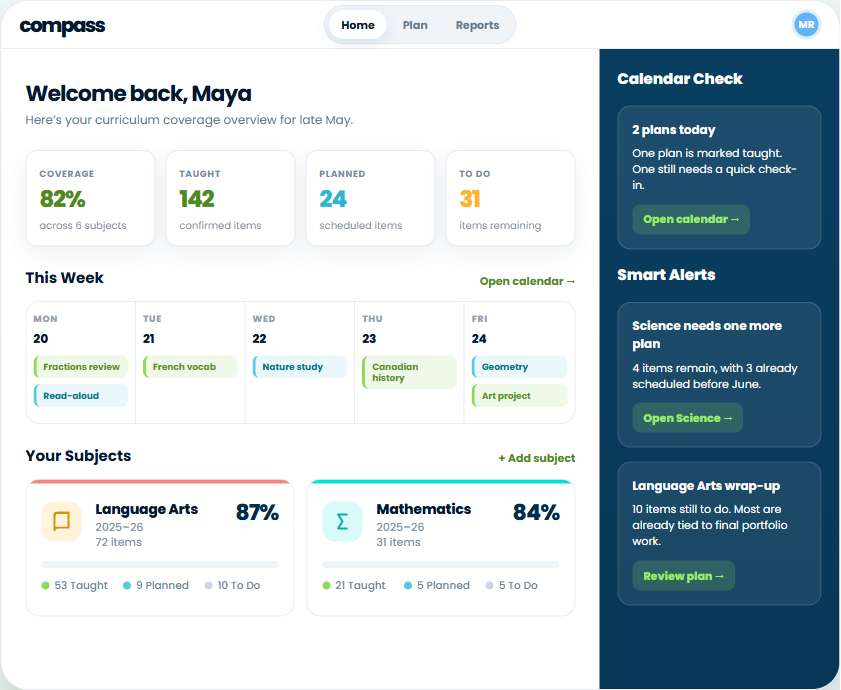
Compass keeps every learning goal as To Do, Planned, or Taught, so the thin spots surface before June does.
Choose the next focus
Get Plan Ideas suggests where to go next, or browse the CARL Library for something another educator has already built.
Build it in CARL
Send it to CARL to draft the lesson and its materials, as an editable draft you review. Confirm what you taught, and Compass updates the record.
A simplified view of a Compass plan: taught, planned, and still to do, goal by goal. Illustrative data.
Start from wherever you sit.
The same two apps, used differently depending on whether you are teaching the learners or supporting the families who do.
Teaching your own
Build the year without starting from a blank page
Begin with a topic, a curriculum outcome, a question your kid asked at breakfast, or a half-formed idea. CARL turns it into something you can actually teach from.
- Lessons, projects, and the student materials that go with them
- Adapt something you already own instead of rebuilding it
- One setup covers multiple ages working on the same topic
- Print it, edit it, or change your mind entirely
Supporting families
Hold several families’ learning in one view
If you are the teacher families check in with, the hard part is rarely the teaching. It is keeping a clear picture across households that all learn differently.
- Families can share view-only access to their classes, so you see coverage as it updates
- Or work from the reports and plan logs a family exports and sends you
- Spot a gap, get Plan Ideas, and send it to CARL to build
- Free to start, so you can try it with one family first
No two homeschools run the same way.
Homeschooling looks different in every house. The planning should not assume otherwise.
Structured curriculum
Plan against a provincial curriculum, another jurisdiction, or a program you have chosen yourself.
Interest-led learning
Start from what has caught their attention this week and work out afterwards which outcomes it touched.
Multi-age at one table
One topic, several grade levels, with the materials pitched differently for each learner.
Pacing that moves
Weeks off, weeks that run long. Coverage picks up where you left it rather than punishing the gap.
One learning goal, and the pieces that go with it.
The lesson is rarely the whole job. What takes the evening is everything that has to exist around it.
Lessons and projects
A plan you can teach from, with the activities and discussion built in rather than left as an exercise for you.
Worksheets and handouts
Practice pages, prompts, vocabulary supports, and exit slips, generated from the same plan so they actually match.
A version pitched differently
The same topic adjusted for a younger sibling at the table, or for the learner who needs it another way.
Notes for the person teaching
A Facilitator Guide comes with the component, so you are not reading the lesson cold at the kitchen table.
Loading preview
The document appears here in a moment, scrollable and ready to print.
Proof of learning, without a filing cabinet.
What Compass keeps
Every learning goal sits in one of three states: To Do, Planned, or Taught. Compass suggests the matches from the planning you are already doing, and you confirm what actually counts. Coverage summaries, detailed breakdowns, and plan logs export as PDF or spreadsheet whenever you need them.
Reporting expectations differ by province and by program, so check yours. What Compass gives you is an organized record to draw from rather than a reconstruction job in June.
- Coverage summary
- Detailed breakdown
- Plan log
- PDF & spreadsheet export
Curriculum you can point at
Eleven Canadian provinces and territories are built in, along with England, Wales, Scotland, Northern Ireland, Mexico, and Common Core. If your family follows a program that is not on that list, upload it and plan against your own source instead.
Made in BC, hosted in Canada, and yours to steer.
You decide what is appropriate
AI can be wrong, sometimes confidently. Everything lands as an editable draft, so you review, revise, and decide what fits your child, your values, your pacing, and your week.
Not legal advice
Home education requirements differ by province and territory. CARL and Compass are planning tools, not provincial approval. Check the rules where you live.
Built and hosted here
CARL is made in British Columbia and application data is hosted in Canada.
Questions homeschool families ask first.
Can I use my own curriculum?
What is the difference between CARL and Compass?
Does this require my child’s personal information?
What does the free plan actually include?
Start with one subject.
Track a week of it in Compass, then build the next lesson in CARL. Add the rest of your year when it feels right.
Free to start, and you set the pace.