From our co-founder

Lesson planning for teachers whose brains don’t do binders

Hi, I’m Courtnay, co-founder of CARL. I have ADHD, and, plot twist, I LOVE a good workflow. Not because organization comes naturally to me. Because it doesn’t. If I can’t see something, it stops existing (object permanence is a struggle), so I build systems that put the whole picture where I can see it. CARL and Compass are that kind of system, built for teachers.

Courtnay, CARL co-founder, waving, with the CARL mascot at her shoulder
Founder’s note

A note from someone who gets the brain, and respects the job.

I’m not a teacher. I won’t pretend to know what it’s like to manage thirty kids while remembering which outcome Tuesday’s lesson was serving (I have two, and that’s plenty for me). But education matters enormously to me, and I know, from the inside, what it costs to run a demanding job on a brain that charges a premium for every act of executive function.

Workflows are puzzles I do for fun, but willpower and working memory have never been enough to carry me. The system has to hold the whole picture, because my head won’t hold it for me. So I build the structure while I’m hyperfocused, and trust it to carry me the rest of the way.

That’s the principle CARL and Compass are built on: externalize the executive function, visualize the big picture, and never start from a blank page. And if your brain is the tidy kind that doesn’t need any of this? Good systems are just good systems, and you’re welcome too.

Teachers deserve tools built that way. So that’s what we built.

Compass: the big picture, finally visible

Object permanence for your curriculum.

You know the rule: out of sight, out of mind. If the coverage tracker lives in a drawer, a spreadsheet, or your own head, it essentially doesn’t exist, and neither do the outcomes hiding in it. Compass’s whole job is to keep your curriculum where your brain can’t lose it: taught, planned, and still-to-come, across every class, in one visual map.

No spreadsheet to maintain. No highlighter system to abandon in November. The tracking updates as a byproduct of planning, so “am I forgetting something?” gets a one-glance answer instead of a 2 a.m. spiral.
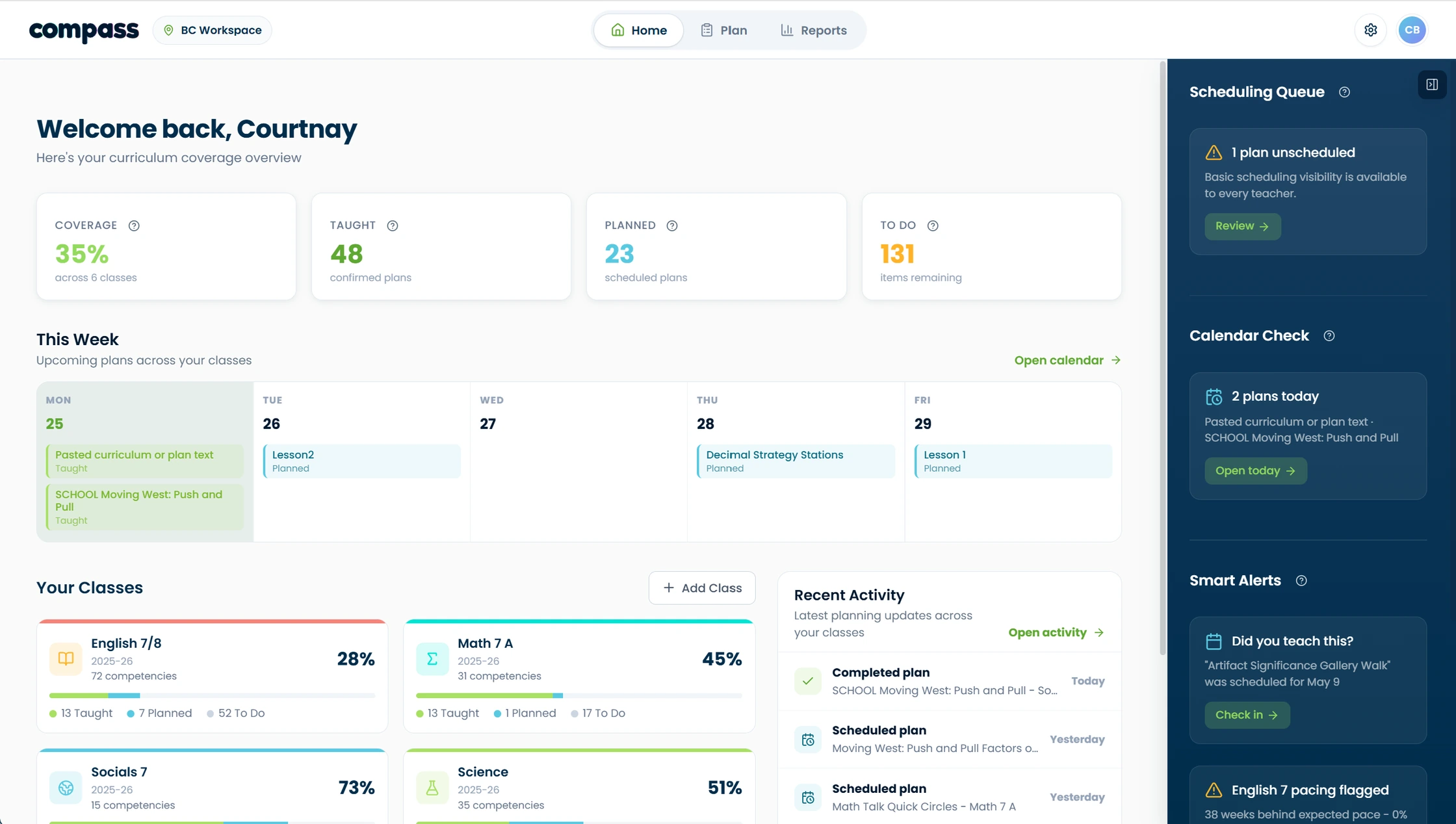
Compass · Coverage overview
The Compass dashboard: a coverage overview with taught, planned, and to-do counts, a weekly plan strip, and per-class coverage bars
The real problem

You can’t just make the plan. First you have to plan to make the plan.

Planning with ADHD is forty open tabs and no bookmark bar. The lesson idea is in there somewhere, along with the curriculum doc, the half-finished worksheet, and the thing you were definitely going to remember. Lesson planning demands exactly what ADHD taxes hardest: starting from nothing, holding details in working memory, sequencing weeks ahead, and switching between tools without dropping the thread. Most advice is “be more organized,” which is like curing nearsightedness with “squint harder.”

How CARL takes the load off
Bring what you’ve already made. Upload the plans you have and CARL builds from them, and Compass reads them for coverage, so nothing you’ve done already goes to waste.
Never start from a blank page. No plan yet? Spark one from a topic, a random brainstorm, a chat, or a library lesson to remix.
Turn a gap into a plan. When Compass flags an outstanding outcome, Get Plan Ideas hands it straight to CARL as a ready starting point, so “I still owe a lesson on this” becomes a draft in one click.
One thread, not six tabs. Lesson, worksheet, assessment, and supports all build from one setup. No re-explaining your context every prompt.
Momentum-friendly. Hyperfocused on a lesson idea at 11 p.m.? Chat it into a full plan while the dopamine’s flowing. It’ll be organized and findable in the morning.
Forgiving, not fragile. Nothing breaks if you disappear for two weeks. No streaks, no empty-grid guilt, just pick right up where you left off.

Free to start. No personal student data.

The Sunday scaries, itemized

Where the planning energy actually goes (and what the system picks up)

“I can’t start.”

Task initiation is the hardest part. Four low-activation entry points: type a topic, talk it out, upload whatever half-thing exists, or remix someone else’s lesson.

“I lost the plan I made.”

Everything lives in one place, attached to the class it belongs to. No archaeology through downloads folders.

“I made the lesson but not the worksheet.”

Materials generate from the same lesson context, so finishing doesn’t require restarting.

“I have no idea what I’ve actually covered.”

That’s Compass. Coverage is a visual map, not a vibe.

For every kind of brain

Helpful for neurodivergent teachers. Built-in support for neurodivergent students.

The same thinking helps you plan for the ADHD, autistic, and otherwise neurodivergent kids in your room: UDL options, chunked instructions, visual supports, and differentiated versions are one request away, attached to the lesson instead of bolted on at midnight.

FAQ

Questions teachers ask first.

Yes and no. I believe that when you tailor a tool for neurodivergent brains, it stays perfectly usable for neurotypical ones, which isn’t true in reverse: tools built only with neurotypical brains in mind leave a lot of us out. Designing this way just widens the circle of people CARL and Compass help. Will it work for every teacher with ADHD? I can’t promise that. I can tell you that for me, seeing the whole picture and having one end-to-end, closed-loop workflow has been the chef’s kiss to my own success.
Yes. I’m Courtnay, CARL’s co-founder, and I have ADHD (a late diagnosis at 29) and a genuine love of workflow design. I designed the visual, externalized system my own brain would find satisfying. I’m not a teacher and don’t claim to be; the classroom expertise stays with you.
Yes. No student names or personal student data needed, and everything is hosted in Canada.
I completely relate, I’ve abandoned plenty. The tools that stick for me have a clear step-by-step flow, keep everything organized but still easy to see at a glance, and don’t punish me for putting them down for a few weeks. Compass is built to be picked back up: forget to log a lesson before you teach it? Drop it in and SmartScan suggests the coverage to slot in (you approve it), so your tracking catches up in seconds instead of guilt-tripping you into quitting.
ChatGPT makes you hold all the context, every prompt, every time. (I’ve got a few hundred chats I’m forever digging through, and I’m not even teaching hundreds of lessons a month.) That’s an executive-function bill, not a discount. CARL holds the context for you.
Yes. Built-in modes cover provinces across Canada, plus UK, US, and Mexico curriculum modes, and you can upload a custom curriculum for anything else.

Plan the lesson while you still feel like planning it.

Open CARL, type the topic that’s in your head right now, and let momentum do the rest.

Get started free →