AI lesson plan builder

A full lesson draft in minutes. Yours to shape.

Start with a topic, a document or a library lesson. CARL’s AI lesson plan builder turns it into a structured, curriculum-informed draft you can edit block by block. You decide what stays.
Lesson Builder

Start where you are

Use the path that matches your planning moment: a blank idea, an existing document, a library lesson, or a conversation.
Start from Scratch
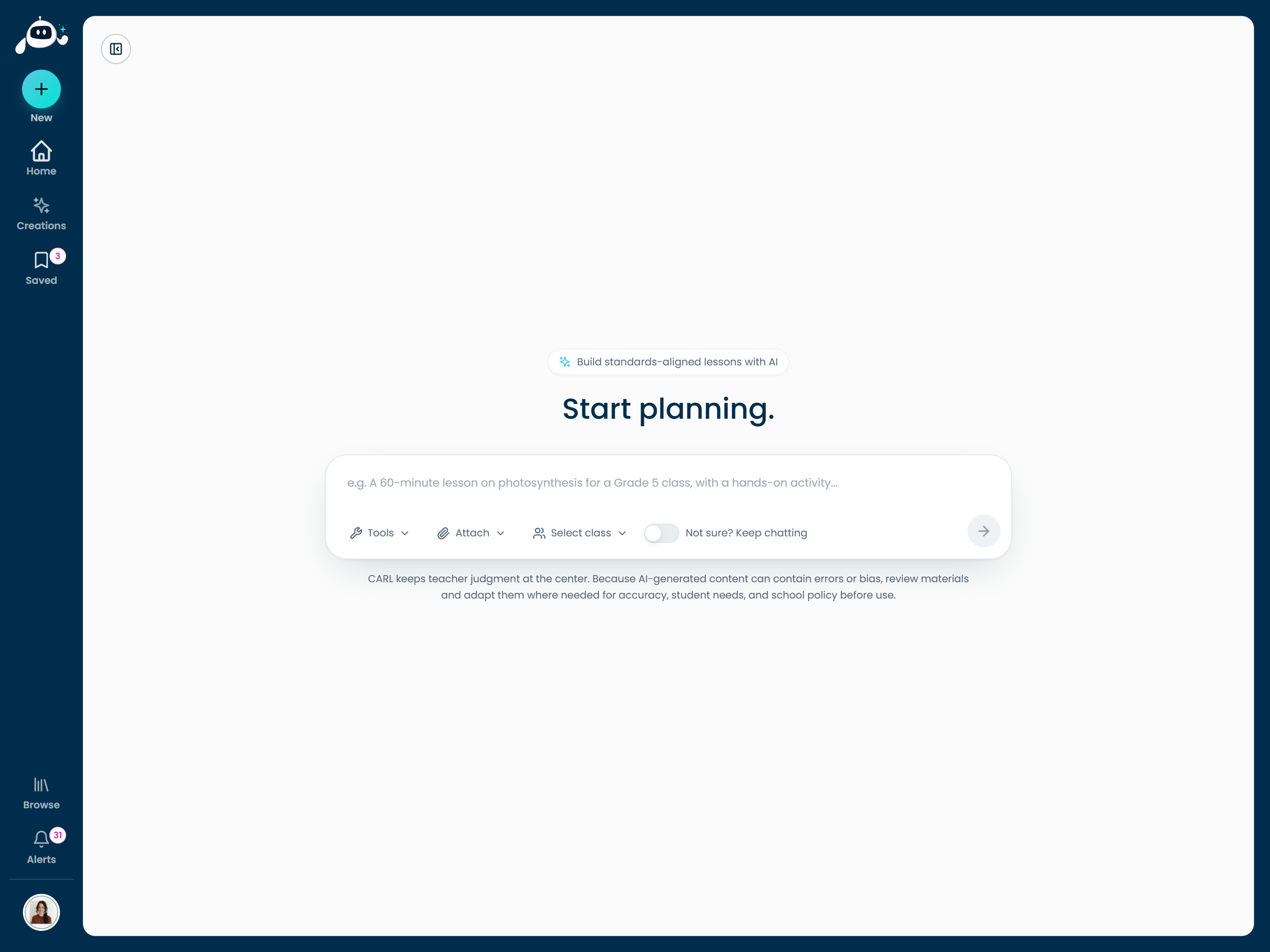
Tell CARL what you’re teaching and choose your setup. The draft comes back ready to review and revise.
1Enter topic, grade, and planning preferences
2Generate an editable lesson draft
3Add worksheets and teaching supports
Learn the planning workflow
CARL also supports
Upload & EnhanceStart from a PDF, Word doc, notes, or an existing lesson.
Remix a LessonMake a shared library lesson your own, without changing the original.
Chat with CARLPlan through a conversation, then move it into the builder.
hicarl.ai
Starting a new lesson in CARL, the Start planning screen
See what CARL builds

A real lesson plan, ready to teach

Here is the Grade 6 Forces in Motion lesson, with three more subjects behind it. Every plan comes out like this, and yours to edit.
1Learning standards → 2Assessment & proficiency scale → 3Learning experiences → 4Reflect & revise
Sample lesson planStructured, curriculum-informed, and yours to edit

Loading preview

The document appears here in a moment, scrollable and ready to print.

Forces in Motion is up first. Switch tabs for the Grade 8 math and health lessons and a two-day Grade 10 unit. Scroll a plan, or open it full size to read it. Learn more about worksheets →

The editor

Every part of it is yours to edit

Rearrange, rewrite, add or remove any block in a clean editor built for teachers, not a locked template.

Edit any block

Rewrite, expand, or trim any part of the plan. Nothing is locked; it’s your lesson.

Rearrange in seconds

Move sections into the order that matches how you actually teach the lesson.

Edit with CARL

Ask for a change in plain words and get a suggested rewrite, right in the editor.

Engagement hooks

Openers that make students want the answer

Give CARL a topic and every lesson opens with two short, everyday scenarios that tie it to something students already know and care about. The two take different angles on the same idea, so more of your class finds a way in. Here is the pair from the Forces lesson above.
Your topic
Forces in motion

That’s all CARL needs. Both hooks are written for Grade 6, from this lesson.

Forces in MotionWritten by CARL · two ways in
The Delicate Robotic Grip
Modern robotic arms in factories use special sensors to hold fragile items like eggs or glass bottles. If the robot squeezes too hard the item breaks, but if it grips too loosely the item slips and falls.
How does the machine keep the object perfectly still?
The Ultimate Block Tower
During a game of stacking wooden blocks, the tower stands perfectly still for several minutes as players carefully add to the top. Suddenly, one tiny touch makes the entire structure wobble and crash to the table.
What changed to make the still blocks suddenly move?
Hard topics get the same treatment. Everyday scenarios, never a re-enactment, paired with the trauma-informed supports built into every lesson.
Built together

Good lessons don’t have to start from nothing

Every lesson a teacher shares becomes a starting point for someone else. Find one close to what you need, make it yours, and republish. The remix lineage always shows who built what.
Remix tree
  • Original The Water Cycle Grade 4 · by Ms. Alvarez
    • Remix The Water Cycle: French Immersion by M. Tremblay + French student materials
    • Remix Water Cycle + Hands-on Lab by Mr. Chen + lab activity & worksheet
      • Remix of a remix Water Cycle + Lab (ELL) by Ms. Okafor + ELL scaffolds & glossary

Every version keeps its history. Authorship stays visible at every step.

The more teachers share, the less anyone starts from a blank page.

Check Your Curriculum

Not sure if your curriculum is covered?

Search your province, state, or framework. If it’s not built in, upload your own.
Browse what CARL supports
Don’t see yours?Upload your district, school, or teacher-created curriculum and CARL plans from it instead.
Flexible Planning

Plan on your terms

CARL adapts to how you actually plan: whichever curriculum you follow, whichever language you teach in, and it connects to Compass when you want to track what you’ve covered.
Curriculum modes

A built-in mode or your own documents; CARL drafts to it and lists the outcomes it covers.

Canadian provinces UK Common Core Universal Custom docs
Language options

Generate lessons in English, French, or Spanish: full immersion, student sheets only, or English with vocabulary woven in. More language supports live in Built-in Supports.

English French French Immersion Spanish Partial integration
Compass coverage

Plan in CARL, then book it into Compass so it lands on your schedule and shows as planned.

Planned Taught To Do Plan Ideas Reports
Explore Compass

Frequently Asked Questions

Common questions from educators about using CARL
CARL mascot with a question mark
Yes. Upload a PDF, Word doc, or your own notes and CARL turns them into a structured draft. You can also bring in your own curriculum documents as a custom mode.
Yes. Lessons can be generated in English, French, or Spanish: full immersion, student sheets only, or English with vocabulary woven in.
No. CARL plans from teacher-set preferences: curriculum mode, grade, subject, language options, timing, and class-level needs. No student names or personal student data required.
A few minutes for a full draft. Reviewing and editing it is where your time goes, and that’s the point.
Yes. Any lesson shared to the library can be remixed. Your copy is independent, and the remix lineage keeps credit visible.

Ready to build your next lesson?

Start from scratch, an upload, a remix, or the shared library, then shape every part.

CARL beside a bookshelf of lessons and plants