Yukon lesson plan generator for teachers
Turn Yukon’s curriculum, built on BC’s, into editable lesson plans, activities, assessments and classroom supports. CARL’s AI drafts in BC curriculum language; you make every call.
Free to start. No student names, no personal student data.
A completed Yukon unit plan.
A Grade 9 Social Studies unit drafted from the BC curriculum in CARL’s lesson plan template, with its worksheet, guide and enhancements. Switch tabs to read the actual files.
Loading preview
The document appears here in a moment, scrollable and ready to print.

Big ideas first. Formatting last.
- Step 1
Start from whatever you have.
A topic, a PDF or Word doc, or a rough idea you talk through with CARL. It all builds on your Yukon setup.
- Step 2
The plan is step one.
Worksheets, exit tickets, success criteria and inclusive supports come from the same lesson.
- Step 3
Edit anything. You decide.
Change blocks yourself or ask CARL in plain words. Every output is an editable draft you review before it reaches students.
Fluent in the BC curriculum Yukon builds on.
Yukon’s curriculum is built on BC’s, with Yukon First Nations ways of knowing and doing woven in. Where BC content exists for your subject and grade, lessons reference it; otherwise CARL works from your uploaded source or neutral planning language.
Big Ideas & Curricular Competencies
The concept-and-competency thread stays visible as you build.
Content learning standards
Lessons anchor to what students learn, grade by grade.
Proficiency language
Emerging to Extending, where your school reports with it.
Yukon First Nations content
Room for Yukon First Nations ways of knowing and doing, on your community’s terms.
One tool, a lot of Yukon planning moments.
Small and multi-grade schools
Parallel versions of one lesson for combined grades.
Land-based and community learning
Space for on-the-land time, Elders and local knowledge.
Refreshing an old binder
Rework a lesson you’ve taught before around current standards.
French Immersion and Core French
Lessons fully in French, French student materials, or teacher notes in English.
Inclusive by design
UDL, ELL and SEL supports where they fit, always your call.
Made in BC. Hosted in Canada. Teacher-controlled.
Your CARL account, lessons and uploads are stored in Toronto. You plan with class-level context.
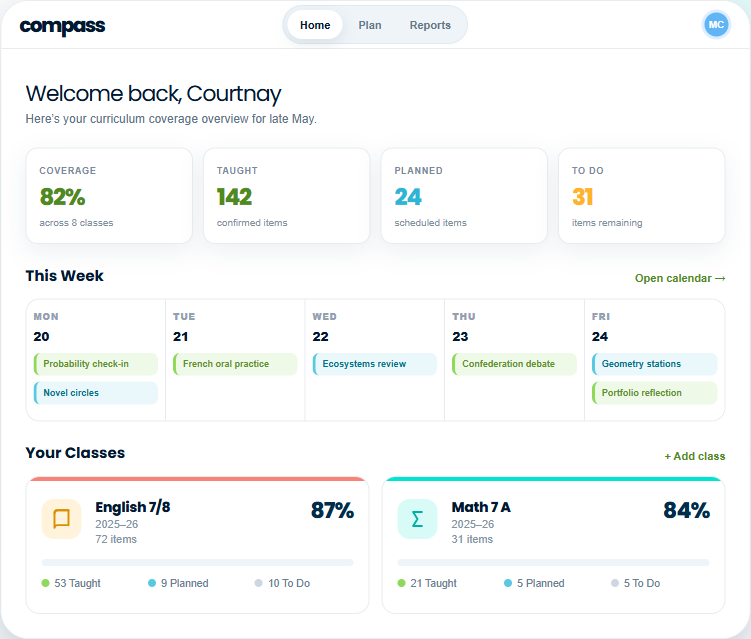
CARL builds the lessons. Compass watches the standards.
Across a term, “have I covered everything?” is a hard question. Compass tracks taught, planned and to-do learning standards against the BC curriculum. Plan with Compass can draft a sequence for the gaps. Review it, then choose a plan to build out in CARL.
Questions Yukon teachers ask first.

Free resources for Yukon teachers.
Download free worksheets and printable activities without an account. To make something custom, sign up and start a new worksheet in CARL.
Pick one lesson from your binder.
Upload it, refresh it, and see what CARL does with the rest of the unit.