CARL for Ontario

Ontario lesson plan generator for teachers

Turn curriculum expectations into editable lesson plans, activities, assessments, and classroom supports with CARL, an AI-assisted planning workflow that speaks Ontario curriculum language and keeps you in charge of every decision.

CARL · Grades 5-8 · Mathematics · Ontario
Fractions & Integers · Grades 5-8 MathematicsAn Ontario-aligned lesson set, yours to edit

Preview coming soon

A real CARL document will render here, scrollable and ready to print.

The expectations problem

Expectations first. Formatting last.

Ontario planning starts with the curriculum: which overall expectations the lesson serves, which specific expectations it touches, and how the learning will eventually show up in assessment and reporting. Generic AI tools don’t hold any of that context. You end up pasting expectation codes into a chat window, checking the output line by line, and reformatting everything for your binder or your admin.

CARL holds the Ontario context for you. Set the grade, subject, strand, and timing once, and every lesson draft, worksheet, and assessment CARL creates builds from that same setup. Edit anything. Nothing reaches students without you.

The usual way
Re-type grade, strand, and expectations into every prompt
Prompt separately for the lesson, the worksheet, the rubric
Double-check whether the AI invented expectations
Reformat everything before it’s usable
With CARL
Set your Ontario planning context once
Generate connected materials from one setup
Plan around teacher-set curriculum details
Editable outputs, ready for your workflow

Free to start. No student names, no personal data.

Ontario curriculum language

Built for how Ontario curriculum is actually organized.

CARL supports planning with the structure Ontario teachers work inside every day, from elementary strands to destreamed secondary courses.

Overall Expectations

Keep the big learning goals of the strand visible while the lesson takes shape.

Specific Expectations

Connect activities and practice to the detailed expectations your lesson actually addresses.

Strands & courses

Plan within elementary strands or secondary course structures, including the current Language (2023) and Mathematics (2020) curricula.

Assessment-aware planning

Draft success criteria, formative checks, and rubric guidance that fit Growing Success-style assessment thinking, shaped and approved by you.

Where teachers use it

One tool, a lot of Ontario planning moments.

Sunday-night planning

Draft Monday’s lesson from a topic and your class context, then adjust the parts that need your judgment.

Long-range plans meeting reality

When the long-range plan says “fractions” and the calendar says “tomorrow,” CARL turns the line item into a teachable lesson.

Destreamed classes

Build differentiated entry points, scaffolds, and extensions for Grade 9 classrooms with a wide range of readiness.

French as a Second Language

Add French vocabulary support, student-facing French materials, or teacher notes in English for Core French and Immersion settings.

Refreshing an old binder

Upload a lesson written under the old Language curriculum and rework it around current expectations.

Four ways in

Start from whatever you have.

Start from a topic

Grade, subject, strand, topic, timing. CARL drafts an editable Ontario lesson.

Upload what you’ve got

PDFs, Word docs, half-finished plans. CARL organizes and strengthens them within your Ontario setup.

Remix from the library

Take a lesson that’s close and adapt an editable version for your classroom.

Talk it through

Chat with CARL to shape a rough idea into a plan before generating anything.

CARL · Create a lesson
The CARL create screen: a Start planning prompt box with attach, class, and chat options

The create screen in CARL: describe the lesson, attach your documents, or keep chatting until it’s right.

Beyond the plan

The lesson plan is step one. CARL keeps going.

Student materials

Worksheets, organizers, exit tickets, practice sets, and handouts connected to the same lesson context.

Assessment supports

Success criteria, formative checks, discussion prompts, rubric guidance, and evidence-gathering ideas you can shape to your board’s expectations.

Inclusive supports

UDL options, ELL scaffolds, differentiation, SEL cues, and accommodations-friendly variations, added where they fit and always under your control.

Canadian-made

Made in Canada. Hosted in Canada. No personal student data.

CARL is built in BC by a Canadian team, hosted in Canada, and designed so teachers plan with class-level context, never student names or personal student information. AI drafts; you decide.

Made in CanadaHosted in CanadaNo personal student dataTeacher-controlled
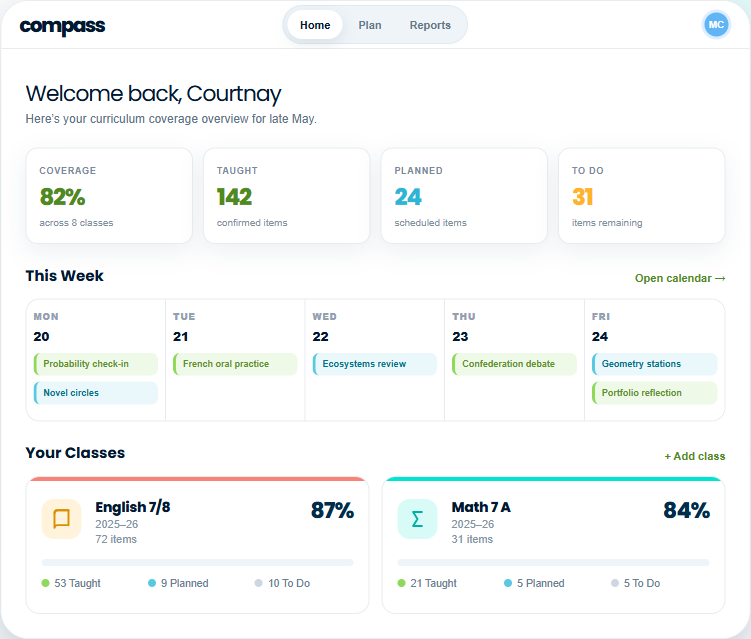
Compass curriculum coverage dashboard: 82% coverage across classes, plus taught, planned, and to-do counts and the week ahead
CARL + Compass

Plan lessons in CARL. See your coverage in Compass.

Ontario has a lot of expectations to keep track of. Compass shows what you’ve taught, what’s planned, and which expectations still need attention, and its Plan Ideas connect straight back into CARL so gaps become lessons.

FAQ

Questions Ontario teachers ask first.

Yes. CARL generates editable Ontario lesson plans, student materials, assessments, and teaching supports as a teacher-controlled workflow, not a one-click replacement for your professional judgment.
Yes. CARL is designed to support Ontario expectation-aligned planning, using the grade, subject, strand, and planning details you set.
CARL’s Ontario planning mode supports current Ontario curriculum, including the 2023 Language and 2020 Mathematics curricula. You can also upload curriculum documents or older plans to align them.
Yes. CARL can generate differentiated entry points, scaffolds, and extensions for classes with a wide range of readiness, which you review and adjust.
Yes. Upload plans, PDFs, Word documents, or rough notes and use CARL to organize, align, and strengthen them.
CARL focuses on planning and classroom materials. Compass, its companion tool, tracks what’s been taught and creates coverage summaries that make reporting-time reviews easier.
No. CARL plans from class-level context and teacher-set preferences. No student names or personal student data required.
Yes. CARL is made in BC, Canada, and hosted in Canada.
ChatGPT is fine for brainstorming. CARL is a planning workflow: Ontario planning mode, connected components, uploads and remixing, inclusive supports, and optional Compass coverage tracking, all with the teacher in control.

Start with the lesson you’re already planning.

Bring a topic, an old plan, or a half-formed idea. CARL drafts, you decide.

Get started free →