BC lesson plan generator for teachers
Build editable lesson plans, activities, assessments, and classroom supports with CARL, an AI-assisted planning workflow built for British Columbia’s curriculum, big ideas, curricular competencies, and the BC proficiency scale, with the First Peoples Principles of Learning and you making every call.
Loading preview
The document appears here in a moment, scrollable and ready to print.
BC’s curriculum works differently. CARL plans in it.
Here’s the thing most tools get wrong: BC redesigned its curriculum around big ideas, curricular competencies, and content standards, with a proficiency scale instead of percentages. It’s a concept-and-competency model, not a checklist of objectives. So a BC lesson plan should read in that language, not a generic “learning goals” template bolted on afterward.
That’s exactly where a generic AI tool trips: it defaults to standardized outcomes and letter grades, then hands you a wall of text you have to translate back into BC’s structure. CARL plans in real BC curriculum language, big ideas, curricular competencies, content learning standards, and the Emerging-to-Extending proficiency scale, and leaves room for the First Peoples Principles of Learning your school already weaves in. Where BC content is available for your subject and grade, lessons reference it; otherwise CARL uses your uploaded source or neutral planning language. It drafts; you verify, edit, and approve.
Free to start. Every draft is yours to edit.
Fluent in how BC organizes learning.
CARL supports planning with the structure BC teachers use every day, from elementary through graduation.
Big Ideas & Curricular Competencies
Keep the concept-and-competency thread of BC’s curriculum visible while you build.
Content learning standards
Anchor lessons to what students are learning, grade by grade.
The BC Proficiency Scale
Emerging, Developing, Proficient, Extending, the reporting language BC uses, drafted in so you’re not translating rubrics by hand.
First Peoples Principles of Learning
Leave room to weave in the First Peoples Principles and Indigenous-authored resources, on your terms and your community’s.
Your old lessons aren’t dead. They’re drafts.
The fastest way into CARL for many BC teachers isn’t a blank page, it’s the binder. Upload a lesson you’ve taught before, and CARL helps you rework it around the current BC standards, then rebuild the worksheet and assessment to match.
Upload and refresh
PDFs, Word docs, old unit plans. Keep the activities that work, update the alignment.
Start from a topic
Grade, subject, topic, timing. CARL drafts an editable BC lesson.
Remix from the library
Adapt a shared lesson into your own editable BC version.
Chat it out
Think through a rough idea with CARL before generating anything.
From BC setup to classroom-ready materials.
Choose BC mode
Set grade, subject, timing, language options, and class-level needs.
Build the lesson
Topic, upload, remix, or chat. Your choice of starting point.
Add the pieces
Activities, assessments, organizers, exit slips, and differentiated supports from the same setup.
Review and approve
Edit wording, timing, and approach before anything reaches students.
Built for real BC classrooms.
City, rural, and remote
From a full Lower Mainland department to a small combined-grade school up-Island or up-north, CARL drafts to the class you actually have.
French immersion and Core French
Full immersion, student-facing French, partial vocabulary support, or teacher notes in English.
Indigenous education
Leave room for the First Peoples Principles of Learning and Indigenous-authored resources, framed the way your community teaches it, not generated for you.
Inclusive by design
UDL, ELL, differentiation, SEL, and accessibility considerations added where they fit, always under teacher control.
Made in BC, hosted in Canada, teacher-controlled.
CARL is built in British Columbia by a Canadian team and hosted in Canada. It plans from class-level context and teacher preferences. AI assists; teachers decide.
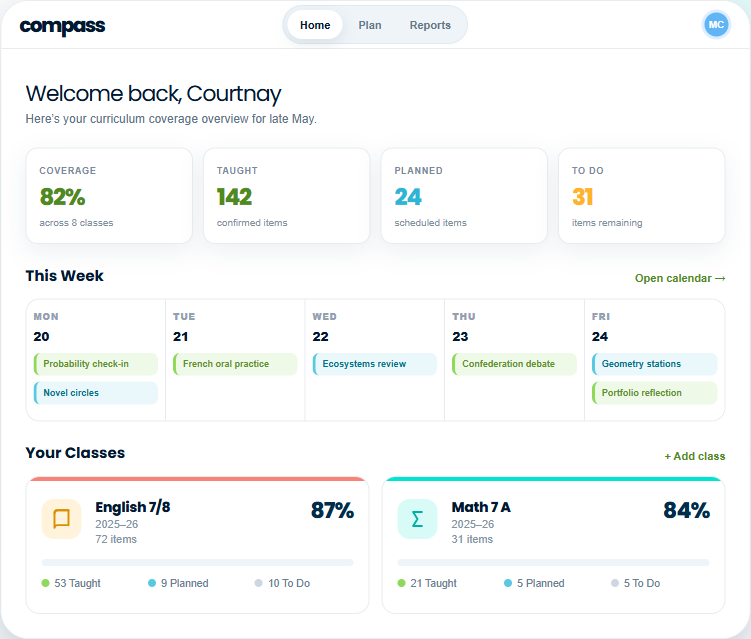
CARL builds the lessons. Compass watches the outcomes.
Across a term, “have I covered everything?” is a hard question. Compass tracks taught, planned, and to-do learning standards against the BC curriculum, and turns gaps into Plan Ideas that flow straight into CARL.
Questions British Columbia teachers ask first.
Free resources for BC teachers.
Grab a worksheet or a whole lesson set, no account needed, then make your own when you’re ready.
Pick one lesson from your binder.
Upload it, refresh it, and see what CARL does with the rest of the unit. You stay in control the whole way.