

Teaching Resources
Everything CARL generates to help you teach more inclusively — including Lesson Enhancements across 6 modules and multilingual ELL Supports. More resources coming as CARL grows.
Two tools, one place
Lesson Enhancements and ELL Supports are both found in the same Teaching Resources panel in your lesson editor. Both generate based on your lesson content, and both are best used after your lesson plan is finalized.
Finalize Your Lesson First
Both Enhancements and ELL Supports generate based on your lesson content. CARL reads what you've written and tailors everything to what's actually in your plan — so the more complete your lesson is before you generate, the better the results.
The 6 Enhancement Modules
Lesson Enhancements are targeted teaching supports generated directly from your lesson content. Each of the 6 modules focuses on a different dimension of inclusive practice — you can generate one, several, or all of them for the same lesson.
| Module | What It Generates |
|---|---|
| UDL & Differentiation | Multiple means of representation, engagement, and expression — specific to your lesson content and activities |
| Equity & Inclusion | Prompts and strategies to surface diverse perspectives and disrupt assumptions embedded in the lesson topic |
| SEL Focus | CASEL-aligned social-emotional learning prompts woven into your existing lesson activities |
| Student Voice Action | Ways to shift agency to students — co-designing success criteria, choosing formats, leading discussions |
| Trauma-Informed Safeguards | Flags potentially triggering content in your lesson and offers opt-in alternatives, quiet zones, and teacher prep notes |
| Indigenous Voice Inclusion | Points to verified Indigenous authors, resources, and perspectives relevant to your topic — CARL does not generate Indigenous content |
How to Generate Enhancements
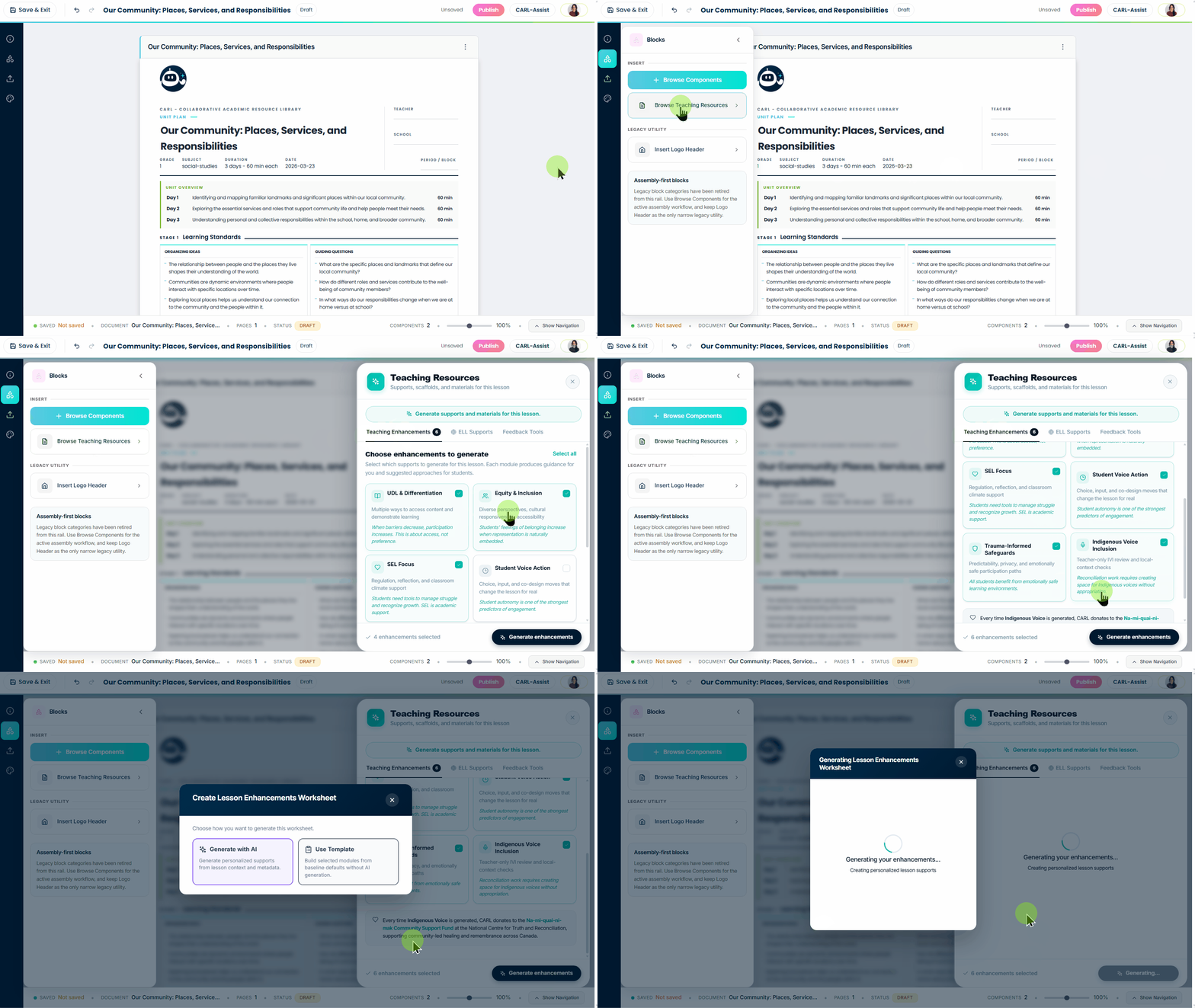
Click to enlarge
Step 1 — Open Teaching Resources
Click the blocks/grid icon in the left sidebar, then click Browse Teaching Resources. You'll land on the Enhancements tab by default.
Step 2 — Select Your Modules
Choose one or more of the 6 enhancement modules. You can select all of them at once — CARL generates each one independently based on your lesson content.
Step 3 — Generate
Click Generate Enhancements. CARL builds targeted teaching supports for each module you selected, tailored to what's in your lesson plan. Each enhancement appears as its own collapsible section in your lesson.
ELL Supports Overview
ELL Supports let you generate multilingual resources for the English language learners in your class. You add the languages your students speak, set their English language proficiency levels, and choose which resources to create — CARL generates everything at once.
| Resource Type | What It Includes |
|---|---|
| ELL Translated Glossary | Key vocabulary from your lesson translated into the student's home language, with definitions and context |
| Pre-Teaching Cards | Visual concept cards to introduce key ideas before the lesson begins — reduces cognitive load during instruction |
| Facilitator Guide | A teacher-facing guide with scaffolding strategies, sentence stems, and language support tips specific to your ELL students' proficiency level |
| Family Bridge | A plain-language summary of the lesson in the student's home language — helps families support learning at home |
How to Generate ELL Supports
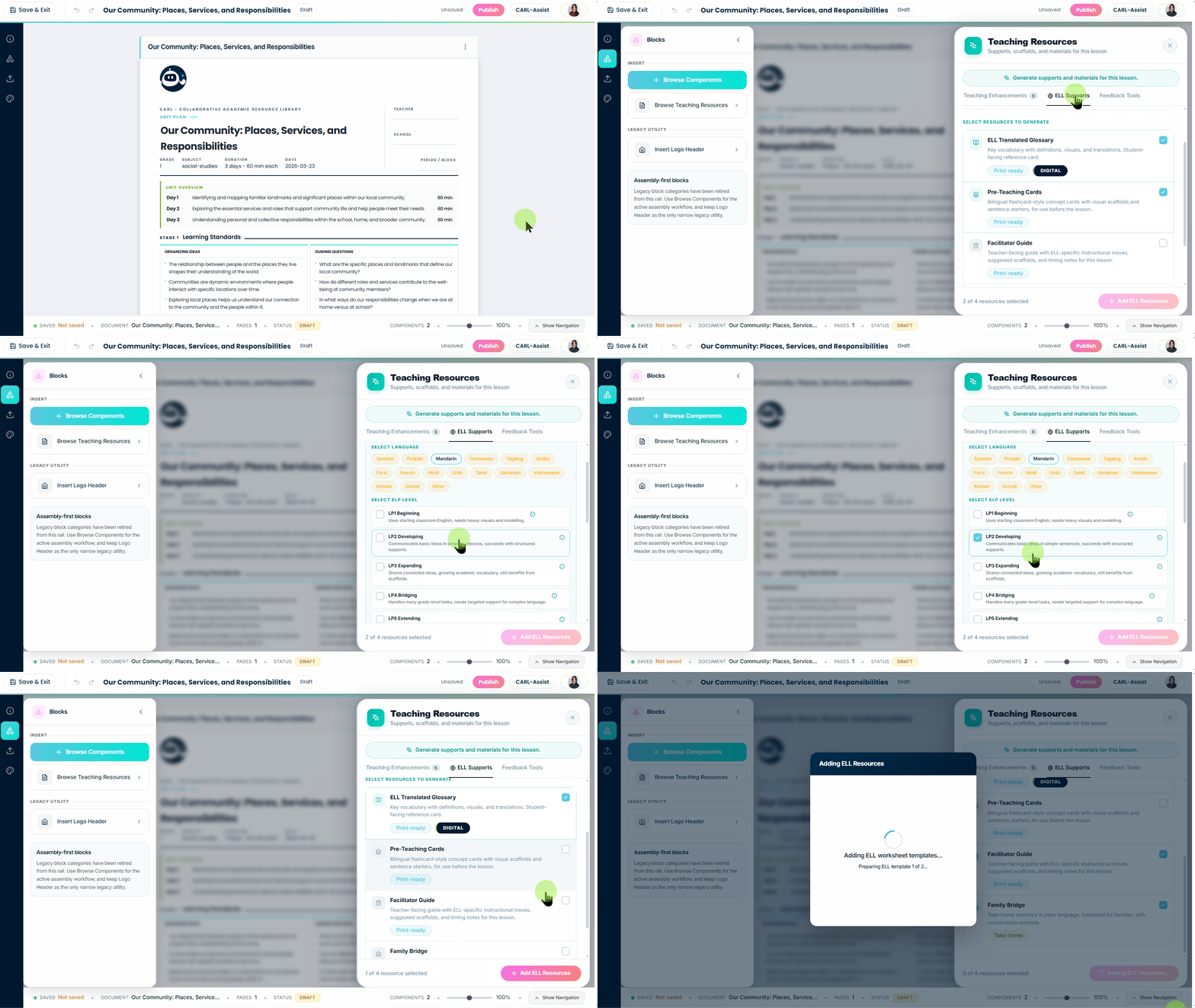
Click to enlarge
Step 1 — Open Teaching Resources
Click the blocks/grid icon in the left sidebar, click Browse Teaching Resources, then switch to the ELL Supports tab.
Step 2 — Add Your Students' Languages
Click Add a Language and select each language spoken by ELL students in your class. You can add as many languages as you need — each one gets its own set of resources.
Step 3 — Set English Language Proficiency Levels
For each language you add, assign the student's English Language Proficiency (ELP) level. CARL uses this to calibrate the complexity and scaffolding in the resources it generates — a Level 1 student needs different support than a Level 4.
Step 4 — Choose Your Resources
Select which of the four resource types you want: ELL Translated Glossary, Pre-Teaching Cards, Facilitator Guide, or Family Bridge. You can select all four — CARL generates them all in one run.
Step 5 — Generate
Click Add ELL Resources. CARL generates everything at once for all the languages you've added. Each language gets its own collapsible section in your lesson with all the resources you selected.
Ready to Build More Inclusive Lessons?
Open any finalized lesson and head to Teaching Resources in the left sidebar. Start with one Enhancement module and work your way through.
Still have questions?
Contact Support